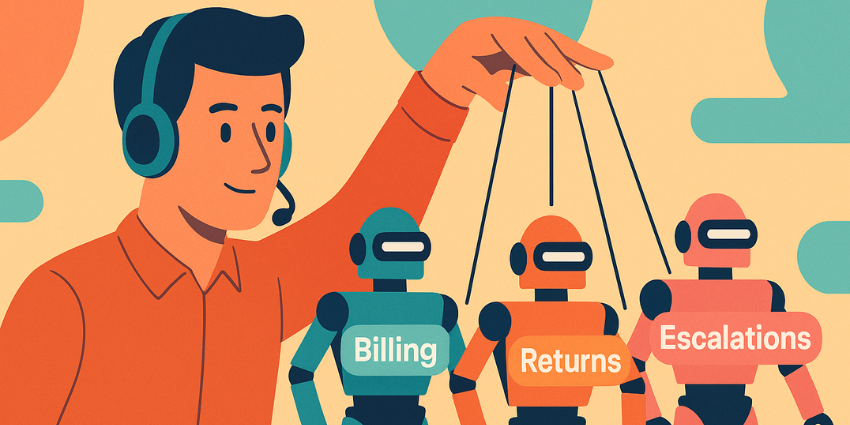

It’s pretty hard to ignore how different CX teams are today. You’re not just wrangling employees from a bunch of generations anymore. Most businesses are creating “blended teams”, augmenting human expertise with an ever-growing number of bots, smart apps, and agentic AI “colleagues”.
The strange part? Leaders keep wondering why things feel disjointed. Why do customers repeat themselves? Why do routines that look perfectly smooth in plans fall apart as soon as they meet the real world? The answer is AI agent orchestration (or the lack of it).
Companies have spent years figuring out how to get human teams to work seamlessly together, but for some reason, they’re skipping that step with their new AI staff members.
Despite 88% of companies are using AI, most of them can’t pinpoint ROI, and they don’t have any idea how to scale their strategy. If you’re going to create a business where AI agents can collaborate with human teams and other bots, you need the orchestration layer.
Related Stories:
- The Secret to Reducing Handle Time Without Cutting Corners
- AI Knows When Your Customers Will Leave – Do You?
- How to Measure Success in Predictive Customer Experience
What is AI Agent Orchestration?
This isn’t the first time companies have had to “orchestrate” how AI works. Every smart IVR, chatbot, or AI copilot needs some kind of map to follow. We’ve all experimented with workflow builders, rule engines, and APIs. AI agent orchestration is a little different, though.
Traditional strategies were all about model routing and workflow steps. Agentic AI orchestration is more about layering specialized agents with humans in a new type of “team” experience.
This includes:
- Autonomous agents with real roles (like qualification or sales agents)
- Reasoning strategies
- Dynamic tool-picking
- Shared memory
- Guardrails for every step
You’ve also got to think about how tasks are broken down, where and when data and context are shared, which apps, tools and databases AI systems can access, and how you’ll watch for mistakes.
It’s all complicated, but necessary, because most businesses aren’t trying to force a single LLM agent to do everything. They need different (specialized) tools for every stage of the customer journey. But if those agents are disconnected, it causes problems, just like when your different customer-facing teams don’t share the same context, data, or goals.
The Problem with Sloppy AI Agent Orchestration
Have you ever watched a customer bounce between sales, marketing, and support like they’re stuck in a bad relay race? It’s painful. Those little gaps between teams turn into clumsy handoffs, missed deals, and the kind of reputation issues that take months to clean up. It’s wild how fast a tiny internal disconnect becomes a very public problem.
Similar problems stack up when your AI agents aren’t aligned.
Going forward, customers are going to spend a lot of time interacting with different types of AI throughout their journey, from the AI bot on your website to the IVR system that routes them to the right employee and the intelligent guide that helps out with onboarding.
If those tools are all disconnected, every stage of the journey is going to feel separate, and customers hate that. Plus, a lack of AI agent orchestration makes it practically impossible to scale your AI strategy. You can’t scale a scattered system. That’s probably why so many analysts (like Gartner) think agentic AI projects are just going to collapse in the years ahead.
The Core Components of an AI Agent Orchestration System
The good news for today’s teams is that most of the biggest CX leaders right now are actually working to make AI agent orchestration easier. You’ve probably already heard about NiCE’s AI orchestration tools and the platforms from companies like Genesys and Salesforce that help businesses plan and manage agentic workflows.
All of these systems differ in the features they offer, but they’ll generally give you access to the same basic building blocks:
- Planning tools: AI systems that break customer goals into steps, decide the order of operations, check what’s allowed under policies, and line up which of your specific AI agents should handle which steps.
- The orchestrator: Basically a “parent” AI agent that handles routing and dispatching tasks, resolving conflicts between agents, managing dependencies (“billing must finish before refunds can run”), and keeping everything from firing at once.
- The specialized agents: Your “team” of dedicated agents meant for specific tasks, like retrieval & knowledge agents, billing & refund agents, compliance agents, troubleshooting agents, escalation agents, and so on.
- Memory systems: Covering both short-term (context for this task) and long-term (knowledge, history, embeddings).
Then, because genuine autonomy can be tricky, there are guardrails. Most systems come with audit logs, agent registries, RBAC for agents, context-aware permissions, and human checkpoints.
AI Agent Orchestration Patterns and Types
The tricky thing about all of this is that AI agent orchestration can still look different for different companies. After all, AI lives in a spectrum, ranging from bots driven by rigid rules to the tools you actually expect to make decisions on their own.
So businesses end up with different strategies, like:
- Centralized orchestration: One AI orchestrator basically runs the show and tells every other agent when to jump in.
- Decentralized orchestration: Agents get a bit more freedom. They can make some decisions on their own or sort things out as a group when it makes sense.
- Hierarchical orchestration: When agents are arranged in layers based on the level of decision-making control they should have.
- Federated orchestration: When groups of agents are governed by specific rules or workflows for certain tasks (like managing finances).
Then there’s also “event-driven orchestration”, which usually combines one of the methods above with decisions driven by real-time triggers (like what your customer does on your website).
How AI Agent Orchestration (Usually) Works
Every company’s version of AI orchestration ends up looking a little different. It depends on the tools you’ve got, the choices someone made five years ago, and whatever shortcuts got taken along the way. Still, most setups fall into a pretty familiar rhythm.
- Perceive: Something happens. A customer pings you. A system throws a little tantrum. A predictive model spots something odd. The system grabs that signal and treats it like real work that needs sorting out, not just noise.
- Plan: The planner breaks the job down. What’s the user trying to do? What steps does that require? This isn’t rigid BPM; it’s more like a senior agent mentally mapping the workflow in five seconds.
- Route: The orchestrator assigns work to specialists in your agentic AI team (or a combination of them in some cases, like a knowledge and billing agent).
- Execute: Agents go off and do their thing. Call APIs, pull records, run RPA in the background, or summarize documents, whatever they’ve been asked to do.
- Monitor: The orchestrator watches for loops, failed tasks, or any instances where a task needs to be reassigned.
- Escalate: If the system hits a wall, the human escalation agent steps in, hopefully with context.
Real World Examples of AI Agent Orchestration (For CX Teams)
All of this sounds complicated until you start looking for examples. Plenty of companies have already set up entirely AI-orchestrated workflows (with a little help from the right tech), for instance:
Refund & Billing
A good example: refunds. Customers hate them. Agents hate them. Finance hates them.
With multi-agent orchestration, the flow actually behaves:
- identity check →
- billing →
- risk rules →
- policy agent →
- refund logic →
- final communication.
RCBC (using Kore.ai) did exactly this and managed to expand service capacity without adding a single human team member.
Troubleshooting / Tech Support
OpenTable’s case is another favorite. Their Salesforce setup orchestrates agents for diagnostics, knowledge lookup, and escalation. The result? 40% better resolution rates, and tens of thousands of restaurant and diner queries handled without melting down frontline staff. That’s what you get when specialised agents don’t trip over each other.
Order & Delivery Issues (Event-driven)
Event-driven setups are where orchestration really makes an impact. FedEx combined Salesforce Data Cloud with orchestrated agents and walked away with a frankly absurd stat: +2,000% ROI from proactive outreach around delivery issues.
Internal Employee Journeys
Global Bank’s HR automation (Kore.ai) knocked out 60% of HR queries, and 31% fewer HR tickets, with no added staff. Deutsche Telekom (Glean) took knowledge lookup from 2 minutes to 18 seconds, summarizing 150+ documents in under four seconds.
The Business Benefits of AI Agent Orchestration
Agentic orchestration is more than something companies just “have” to think about if they’re planning on scaling an AI strategy these days. Done well, it really does drive results like:
Efficiency: When your AI agents actually talk to each other, everything feels smoother. AUTODOC dumped their old multilingual setup, rebuilt it around orchestrated Kore.ai agents, and saw handle times drop by 20 percent. Workload fell by 30 percent. CSAT climbed by 15 points. It’s the kind of improvement you can feel in the whole operation.
Better customer experience: Consistency is the underrated hero here. When every channel reads from the same logic, customers stop bouncing around. Orchestration gives AI agents the same memory and rules across channels.
Scalability: It’s way easier and way cheaper to grow a system that already behaves like a team. You’re not reinventing the wheel every time you spin up a new specialist agent. You’re just adding another player to the lineup.
Better decision-making: When all your systems collect and act on the same data, you’ll find that the decisions you make seriously improve. You can even more easily spot the gaps in your workflows that you can enhance with AI and automation.
Reliability: With real agentic workflow orchestration, you get traceable decision trails, policy adherence, and systems you can actually audit without headaches.
The Challenges of AI Agent Coordination
Here’s the honest part: running a group of AI agents isn’t simple. Even with great tech, there are a few headaches you’re going to run into. Stuff like:
- Coordination complexity: If you throw a dozen agents into production without a plan, you get a mess. Agents overlap. Agents contradict each other. Agents loop. This is why roles, scopes, and sequencing rules matter just as much as model quality.
- Data quality + integration: AI’s only as good as whatever you feed it. If your data’s outdated, contradictory, or stuck inside some crusty legacy app nobody wants to touch, your agents will act confused and unpredictable. It’s not their fault. They’re guessing.
- Governance gaps: If you don’t have clear identities for each agent or logs that show who did what, you lose control fast. Without permissions, guardrails and a real escalation plan, you’re basically handing the system the front-door keys and hoping it behaves.
- Human workforce impact: When agentic orchestration is rolled out with zero explanation, frontline teams end up guessing what’s automated and what’s not. That’s when trust collapses.
The Practical Roadmap to AI Agent Orchestration
This step-by-step guide will probably change a little depending on your tech stack. Most companies offering their own AI agent orchestration tools give you specific, crucial moments to think about. For the time being, though, here’s what your path ahead might look like:
Step 1: Decide what you care about (really care about)
Write down the actual metrics you want to change:
- average handle time
- first-contact resolution
- CSAT
- back-office backlog
- total cost-per-interaction
This is really going to dictate what kind of AI agents you need in your team.
Step 2: Map your “islands of automation”
Look at everything smart you’ve got in your system. Your RPA bots, chatbots, LLM pilots, abandoned IVR flows, rogue Zapier automations, and brand-new agentic AI systems, put them all on one page. Most companies discover they already have half an orchestra; they just don’t have a conductor.
Step 3: Design the “team of agents”
Forget mega-bots. Build narrow specialists:
- Triage
- Retrieval
- Billing/refund
- Compliance
- Workflow/rpa
- Knowledge
Then decide:
- Who does what
- In what order
- With what permissions
- And under which guardrails
This is where you set the personality of your agentic workflow orchestration.
Step 4: Put the brains where they belong
Two big ones:
- LLM = reasoning + output
- Orchestrator = decisions + sequencing
Mix them up, and you’ll get agents hallucinating system access they don’t have. Happens more often than you’d think.
Step 5: Build observability before you go live
You need:
- Audit logs
- Event trails
- Dashboards
- Error traces
- Someone who actually checks them
The moment you can see what happened inside the agent swarm, everything gets easier.
Step 6: Choose the platform that fits your DNA
Usually, it helps to pick AI-agnostic orchestrators and make sure you can re-use your existing API playbooks, but a few options to consider:
- CX-first: Kore.ai, Talkdesk, Genesys, NiCE, etc.
- Process-first: UiPath
- Data-first: Adobe, Salesforce
- Integration-first: Workato
- Infra-first: Akka
Step 7: Deploy, monitor, adjust, repeat
This isn’t a “launch and forget.” It’s a new operating model. Great teams iterate weekly. Bad teams wait six months and wonder why everything stagnates.
When your first few journeys work, expand. Connect CX → HR → IT → Finance. Be ready to keep measuring and tweaking as you go.
AI Agent Orchestration: The Missing Layer for CX
I’ve seen so many companies roll out agentic AI in the last few years, and what really stands out is how many brands think they’re “modernizing”, when they’re really just piling gadgets onto an already wobbly foundation. More bots, more copilots, more models. It’s no wonder everything ends up getting messy.
If you really want your agentic AI investment to mean something this year (and you want to make sure that every member of your team, AI or human, can work together), you need orchestration. It’s really the only way to connect the dots and make sure you’re not making mistakes that actually make the customer experience work, or cause a huge number of compliance headaches.
Need more guidance on how to prepare for the next era? Check out our Ultimate Guide to AI and Automation in CX, and remember that investing in more AI won’t help you unless you’ve figured out how to manage the digital colleagues you already have first.
FAQs
What is AI agent orchestration in simple terms?
AI agent orchestration is the process of coordinating multiple AI agents, tools, and human teams so they work together as a unified system across workflows and customer journeys.
How is AI agent orchestration different from a chatbot?
Unlike a chatbot that handles a single conversation flow, AI agent orchestration manages multiple specialized agents, systems, and decision layers across end-to-end processes.
Why do AI agent projects fail without orchestration?
AI projects fail without orchestration because disconnected agents create inconsistent decisions, duplicated work, compliance risks, and poor ROI visibility.
What are the key components of an AI orchestration platform?
An AI orchestration platform typically includes a planning engine, a central orchestrator, specialized agents, shared memory systems, governance controls, and monitoring tools.
Is AI agent orchestration only for large enterprises?
No, any organization running multiple AI tools, bots, or automation systems can benefit from orchestration to reduce fragmentation and improve scalability.